update kalau tdk bisa cb ini : ROCHIM_MY ELECTRIC

Selasa, 12 April 2011

Program Pengolah Warna Menggunakan Visual Basic

Pada postingan kali ini, kita akan membahas sebuah program yang dapat kita gunakan untuk mengolah warna khususnya RGB (Red,Green and Blue) menggunakan visual basic. Program ini sebenarnya akan menjadi dasar yang baik bagi kita untuk mempelajari tentang pengolahan citra (image prosessing).
Adapun langkah-langkah pembuatan program pengolah warna menggunakan visual basic adalah sebagai berikut:

Buka program Visual Basic yang telah terinstal di komputer anda. Saya menggunakan visual basic versi 6.0.
Buat sebuah project baru.
Tambahkan sebuah control shape, sebuah kontrol frame (tidak terlalu penting) dan sebuah kontrol Vscroll/Hscroll dan beberapa label.
Ubah properties masing-masing kontrol terserah anda. Untuk kontrol shape1, ubah fillcolor jadi solid.
Copykan sebanyak dua kali kontol Vscroll/Hscroll. Jika muncul pesan klik yes. Sehingga akan terbentuk kontrol array dari Vscroll/Hscroll.
Susun program anda sedemikian rupa atau seperti gambar.1.


Gambar.1 Tampilan Program Pengolah Warna
Klik dua kali kontol Vscroll/Hscroll dan sisipkan script program berikut.
Shape1.FillColor = RGB(Vscroll1(0).Value, _
Vscroll1(1).Value, Vscroll1(2).Value)
Jalankan program buatan anda. Atur nilai warna, jika warna dari shape berubah maka program yang anda buat telah berhasil.

Program tersebut dapat terus dikembangkan dan semoga dapat membantu anda untuk mendalami pengolahan citra khususnya menggunakan visual basic.

Nb. Saya sendiri sedang melakukan penelitian untuk membuat sebuah robot yang berkerja di pertanian untuk menanam bibit. Robot ini menggunakan dua buah kamera. Dimana kamera pertama berkerja dengan skala abu-abu untuk mendeteksi lahan dan berkerja sebagai sensor posisi. Dan kamera kedua berkerja dengan skala RGB untuk mendeteksi bibit apakah telah sesuai untuk kemudian di tanam di lahan.

Membuat Program Editor Sederhana

Program editor merupakan program yang digunakan untuk membuat naskah,editing dan lain sebagainya yang terkait dengan tulisan. Contoh program editor adalah seperti notepad.exe, sebuah program editor bawaan dari windows. Namun pada artikel kali ini akan dibahas bagaimana membuat sebuah program editor sederhana menggunakan visual basic.
Untuk membuat program editor sederhana ini relatif cukup mudah. Khususnya bagi anda yang telah memiliki background proggraming yang terbilang cukup. Yap mungkin Andiero langsung saja mengulas bagaimana langkah-langkah membuat form editor sederhana menggunakan visual basic ini. Adapun langkah-langkahnya adalah sebagai berikut:

1. Buka program visual basic yang telah terinstal di komputer anda. Dalam hal ini Andiero menggunakan Visual Basic versi 6.0.
2. Buat sebuah project baru. Dan pilih Standart EXE.
3. Sebelumnya anda tambahakan dulu dua komponen baru dari visual basic yaitu RichtextBox dan CommonDialog. Caranya klik Project>>Components… atau cukup tekan Ctrl + T. selanjutnya pada jendela components, berikan centang pada Microsoft Common Dialog Control 6.0 dan Microsoft Rich Textbox Control 6.0.
4. Selanjutnya pada form desain, tambahkan sebuah RichTextBox Control, CommonDialog Control dan dua buah Command Button Control dan desain seperti gambar.1 berikut.


Gambar.1 Tampilan Program Editor Sederhana menggunakan Visual Basic

5. Atur propertiesnya sedemikian rupa. (Andiero melakukan perubahan properties pada bagian-bagian yang dianggap penting. Anda dapat melihat dan menganalisanya berdasarkan program yang dibuat.)
6. buka jendela code dan ketika script berikut:
Dim nama_file As String
7. klik dua kali button save dan ketikan script basic berikut
CmnDialog.Filter = "Text (*.txt)|*.txt" 'file type hanya berekstensi .txt
CmnDialog.FileName = "*.txt" 'filename default
CmnDialog.CancelError = True 'Nilai cancel true

On Error GoTo tangani_error 'jika ada error loncat ke pesan_error
CmnDialog.ShowOpen 'membuka jendela open
nama_file = CmnDialog.FileName '

On Error GoTo pesan_error
RtfEditor.LoadFile nama_file 'menampilkan file yang di buka ke rtfeditor
Exit Sub

pesan_error: 'penanganan error
MsgBox "Tidak dapat membuka File", vbCritical
tangani_error:
8. klik dua kali button open dan ketikan script berikut
CmnDialog.Filter = "Text (*.txt)|*.txt"
CmnDialog.CancelError = True

On Error GoTo pesan_error
CmnDialog.ShowSave
nama_file = CmnDialog.FileName

On Error GoTo tangani_error
RtfEditor.SaveFile nama_file, rtfText

Exit Sub

pesan_error:
MsgBox "File Tidak dapat di Eksekusi!", vbCritical, "Peringatan!"
tangani_error:

9. selesai. Jalankan program yang telah anda buat dan uji cobakan dengan membuat sebuah tulisan dan dan menyimpannya. Selanjutnya coba buka tulisan yang anda buat. Jika tidak ada error, program telah berhasil anda buat. Lihat gambar.2 berikut:

Gambar.2 Menjalankan Program

10. Coba untuk mengembangkan programnya sehingga memiliki fungsi dan fitur yang lebih canggih lagi. Contohnya seperti gambar.3 berikut


Gambar.3 Program Editor.Exe buatan Andiero


Interfacing Port Paralel dengan Seven Segment


Gambar.1 Blok Diagram Sistem

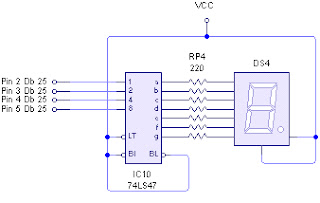
Begitu banyaknya aplikasi elektronika yang bisa kita buat kita kendalikan menggunakan komputer memberikan kepada kita banyak pilihan. Salah satunya yang akan kita bahas kali ini yaitu interfacing port paralel dengan tampilan seven segment. Untuk sistem dari interfacing port paralel dengan tampilan seven segment ini dapat dilihat seperti pada gambar.1.
Komponen yang kita butuhkan untuk membuat system interfacing port parallel dengan tampilan seven segment ini adalah sebagai berikut:
1. Seven segment common anoda
2. driver seven segment common anoda 74LS47
3. Port parallel DB 25 Male

Untuk rangkaiannya dapat anda lihat pada gambar.2 berikut.


Gambar.2 Rangkaian Interfacing Port Paralel dengan Seven Segment

Selanjutnya kita akan membuat program pengendalinya menggunakan visual basic. Sebelumnya untuk lebih jelas anda dapat melihat tabel.1 yang berisi logika untuk menampilkan angka pada seven segment.


Tabel.1 Konversi Bilangan dan Logika


Dari tabel tersebut kita membuat program pengendalinya menggunakan visual basic sebagai berikut. (Lihat materi interfacing port parallel yang lain di blog ini).

Untuk menampilkan angka 1 maka pada program visual basicnya kita tulis sebagai berikut:

Output 888, &H01 ‘atau Output 888, 1

Dan seterusnya hingga angka sembilan seperti berikut:

Output 888, &H0A ‘atau Output 888, 9

Program tersebut dapat anda letakan pada control command button atau yang lainnya. Jika anda ingin membuat tampilan seven segmentnya melakukan perhitungan/counter dari 0 hingga 9 dan seterusnya maka gunakan script yang ini:

Dim a As Integer

a=0

Output 888, a

a = a +1

if a>= 9 then a =0

Script tersebut letakan di control timer sehingga dapat melakukan perulangan terus menerus.


Sabtu, 05 Maret 2011

AdSense

"This post confirms my ownership of the site and that this site adheres to Google AdSense program policies and Terms and Conditions."

Sabtu, 26 Februari 2011

Interfacing Parallel Port with Visual Basic

Microsoft’s Visual Basic has been the most popular choice for Basic programmers developing Windows programs. Unlike other Basics, however, Visual Basic for Windows doesn’t include Inp and Out for port access. However, you can add Inp and Out to the language in a dynamic linked library (DLL). A DLL contains code that any Windows program can access, including the programs you write in Visual Basic. This tutorial includes IO.dll and you can download this file in http://www.geekhideout.com/iodll.shtml .

This is the DLL itself, containing the routines that your programs will access. You can call the prototype of that routines like this

Public Declare Sub PortOut Lib "io.dll" (ByVal Port As Integer, ByVal Data As Byte)
Public Declare Function PortIn Lib "io.dll" (ByVal Port As Integer) As Byte 
 
Or like this:

Private Declare Sub PortOut Lib "io.dll" (ByVal Port As Integer, ByVal Data As Byte)
Private Declare Function PortIn Lib "io.dll" (ByVal Port As Integer) As Byte


For Example:

Private Declare Sub PortOut Lib "io.dll" (ByVal Port As Integer, ByVal Data As Byte)
Private Declare Function PortIn Lib "io.dll" (ByVal Port As Integer) As Byte 

Private Sub Command1_Click()
PortOut 888, 0 'All LED OFF
End Sub
Private Sub Command2_Click()
PortOut 888, 255 'All LED ON
End Sub

It's Very Easy! You Can Do it in your home! Keep Smile and Stay On My Blog!

Keyword: Interfacing Port Parallel, Interfacing port paralel , interfacing using visual basic, interfacing menggunakan visual basic,


Rabu, 30 Juni 2010

Alexandria, "The Pearl of the Mediterranean"


The second largest city in Egypt, Alexandria, known as "The Pearl of the Mediterranean", with a population of 4.1 million, is the second-largest city in Egypt, and is the country's largest seaport, serving about 80% of Egypt's imports and exports. Alexandria is also an important tourist resort.


    Alexandria was founded by Alexander the Great in
April 331 BC. Alexandria became the capital of  Graeco-Roman Egypt until the Muslim conquest of Egypt in AD 641 when a new capital was founded at Fustat (Fustat was later absorbed into Cairo).
   
    In ancient times, Alexandria was one of the most famous cities in the world. Alexandria was known because of its lighthouse (Pharos), one of the Seven Wonders of the Ancient World; its library (the largest library in the ancient world); and the Catacombs of Kom el Shoqafa, one of the Seven Wonders of the Middle Ages. Ongoing maritime archaeology in the harbour of Alexandria, which began in 1994, is revealing details of Alexandria both before the arrival of Alexander, when a city named Rhacotis existed there, and during the Ptolemaic dynasty.

    This section of Alexandria is known to us more from books then what we may actually see in the area. Where the  Pharos Lighthouse once stood, is now occupied by the Fort of Quit Bay ,out on the area that circles up around the top of Eastern Harbor forming the eastern section of the top of the T. Heading south from the Fort of Quit Bay, we come to the stunning Abu El-Abbas Mosque .West of this is the Anfushi Tombs , some of the oldest in Alexandria and well worth a visit.

    Most of the citizens of Alexandria adhere to the religion of Islam. The most famous mosque in Alexandria is Abu el-Abbas el-Mursi Mosque in Anfoushi. Other notable mosques in the city include Ali ibn Abi Talib mosque in Somouha, Bilal mosque, El-Gamee el-Bahari in Mandara, Hatem mosque in Somouha, Hoda el-Islam mosque in Sidi Bishr, El-Mowasah mosque in Hadara, Sharq el-Madina mosque in Miami, El-Shohadaa mosque in Mostafa Kamel, Qaed Ibrahim mosque, Yehia mosque in Zizinya, Sidi Gaber mosque in Sidi Gaber, and Sultan mosque.


Reference:
http://www.touregypt.net/alexandria/index.htm
http://en.wikipedia.org/wiki/Alexandria
http://bocah-cakil.blogspot.com
http://anekahobi.wordpress.com

Senin, 28 Juni 2010

Sami Yusuf , A Islam's Biggest Rock Star

Without You
Klik Here For Download  Asma Allah

Sami Yusuf is a British composer, singer and accomplished musician. Sami's first album Al-Mu'allim was self-produced and released in July 2003 and attained huge success. His second album, My Ummah, which was released in 2005, comes in two versions, a musical version and one with just percussion and his second album 'My Ummah' have sold over five million copies worldwide (with a third album nearing completion).

Sami was born in July 1980 into a musical family of Azeri origin in Tehran, Iran, learning to play several instruments at a very young age and demonstrating a keen interest in singing and composing. He studied music at several institutions and with renowned composers and musicians, including composers from the Royal Academy of Music in London, one of the world most prestigious music institutions. In addition to his education in Western harmonics and composition, Sami has a solid understanding of the Middle Eastern modes (or Maqams), and is thoroughly acquainted and familiar with both Eastern and Western musical traditions.

Sami has been featured by Time Magazine as "Islam's biggest rock star" and has appeared on the covers of dozens of other mainstream publications around the world. Sami is devoutly spiritual and often uses his art and music as a means of moting the messages of love, mercy, peace and tolerance, whilst encouraging the youth to be proud of their identity.

Sami Yusuf’s songs have revolutionalized the nasheed industry and have given birth to a new genre of modern Islamic music. His latest song You Came To Me has been released as an immense hit all over the world. It has had more than 1,000,000 views on Youtube.


And you can Download Sami Yusuf's song in http://kalamftunsri.tk. Try Not To Cry is one of many his song and this is the Lyrics of that.


Try Not To Cry

You, you’re not aware,

That we’re aware

Of your despair

Don’t show your tears

To your oppressor

Don’t show your tears


CHORUS:

Try not to cry little one

You’re not alone

I’ll stand by you

Try not to cry little one

My heart is your stone

I’ll throw with you


Isam:

‘Ayn Jalut where David slew Goliath

This very same place that we be at

Passing through the sands of times

This land’s been the victim of countless crimes

From Crusaders and Mongols

to the present aggression

Then the Franks, now even a crueller oppression

If these walls could speak,

imagine what would they say


For me in this path that I walk on

there's only one way

Bullets may kill, bones may break

Still I throw stones like David before me and I say


CHORUS


You, you’re not aware

That we’re aware

Of your despair

Your nightmares will end

This I promise, I promise


CHORUS


Lenny:

No llores, no pierdas la fe

La sed la calma el que haze

Agua de la arena

Y tu que te levantas con orgullo entre las piedras

Haz hecho mares de este polvo

Don’t cry, don’t lose faith

The one who made water come out of the sand

Is the one who quenches the thirst

And you who rise proud from between the stones

Have made oceans from this dust


Waqas:

I throw stones at my eyes

’cause for way too long they’ve been dry

Plus they see what they shouldn’t from oppressed babies to thighs

I throw stones at my tongue

’cause it should really keep its peace

I throw stones at my feet

’cause they stray and lead to defeat

A couple of big ones at my heart

’cause the thing is freezing cold

But my nafs is still alive

and kicking unstoppable and on a roll

I throw bricks at the devil so I’ll be sure to hit him

But first at the man in the mirror

so I can chase out the venom


Isam:

Hmm, a little boy shot in the head

Just another kid sent out to get some bread

Not the first murder nor the last

Again and again a repetition of the past

Since the very first day same story

Young ones, old ones, some glory

How can it be, has the whole world turned blind?

Or is it just ’cause it’s only affecting my kind?!

If these walls could speak,

imagine what would they say

For me in this path that I walk on

there’s only one way

Bullets may kill, bones may break

Still I throw stones like David


Tags: sami yusuf, biografi sami yusuf, free download sami yusuf's song, free download sami yusuf song, free download Try Not To Cry , Lyrics Nasheed , Lyrics of Try Not To Cry , Try Not To Cry , Lirik Nasyid , Lirik Try Not To Cry , Free Download MP3 ,